Teamspot for logistics managers and operations directors

Workforce scheduling for logistics managers who need every shift covered

Build schedules around staffing demand, skills, and company rules. Managers review proposed assignments, open shifts, and worked hours before publishing the schedule or exporting time records.

Teamspot workforce schedule for a logistics operation with shifts, employees, and coverage information

The daily logistics operation

Four decisions that determine whether each shift has the coverage it needs

Teamspot keeps scheduling connected to availability, skills, absence, and worked hours without replacing your WMS.

Capacity and coverage

See staffing gaps before the shift starts

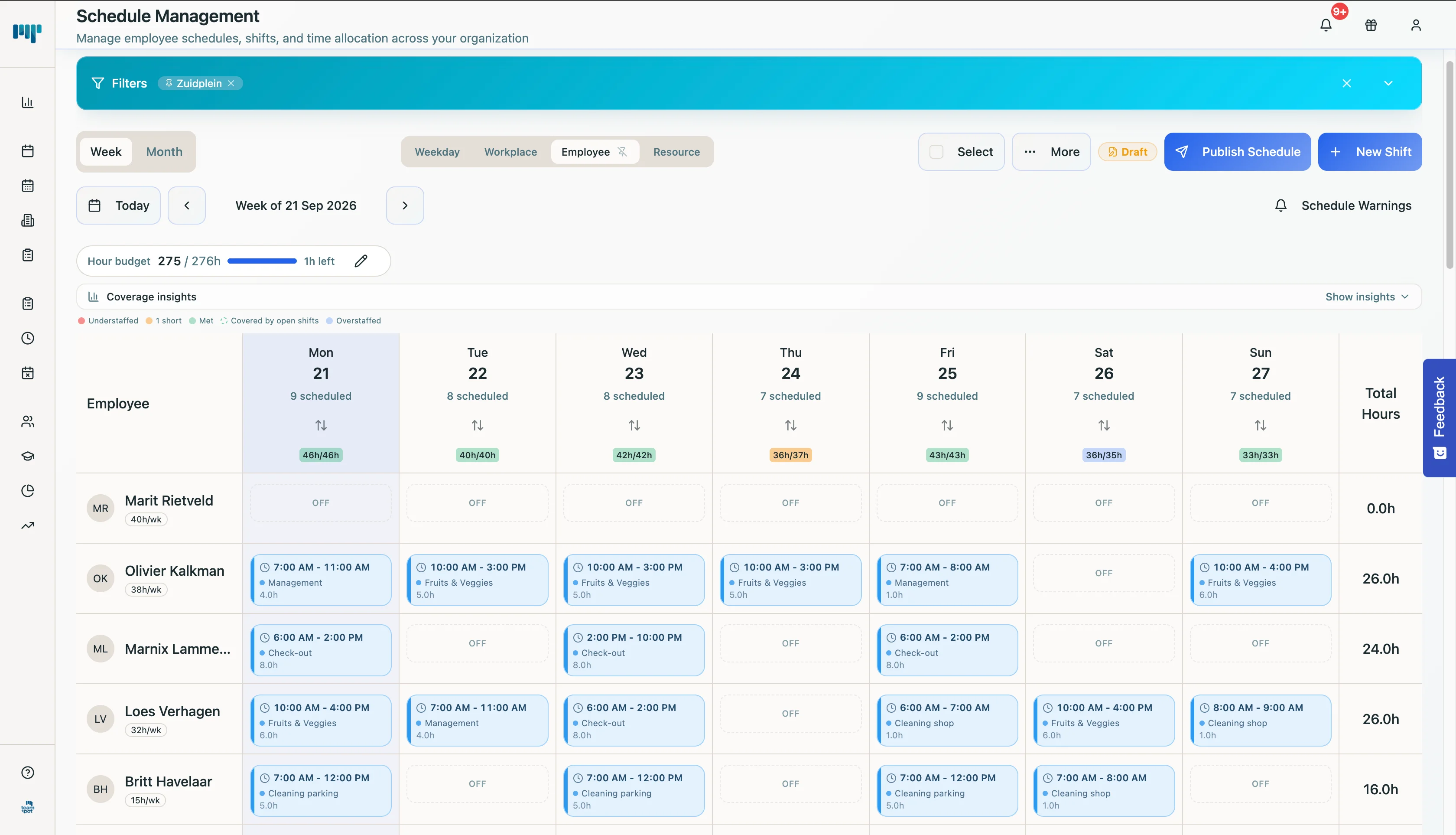
Define staffing demand for each period and build the schedule around the coverage the operation needs. Open shifts and hours remain visible before supervisors discover a capacity problem on the floor.

  • Make required coverage visible for every shift.
  • Keep open shifts and hours in view.
  • Review the proposal before applying the schedule.
Explore Teamspot for logistics
Teamspot weekly schedule with coverage and open staffing gaps
A populated weekly schedule shows coverage and remaining gaps before the shift starts.Enlarge — opens in a new tab

Rules and skills

Schedule the right people without breaking hard rules

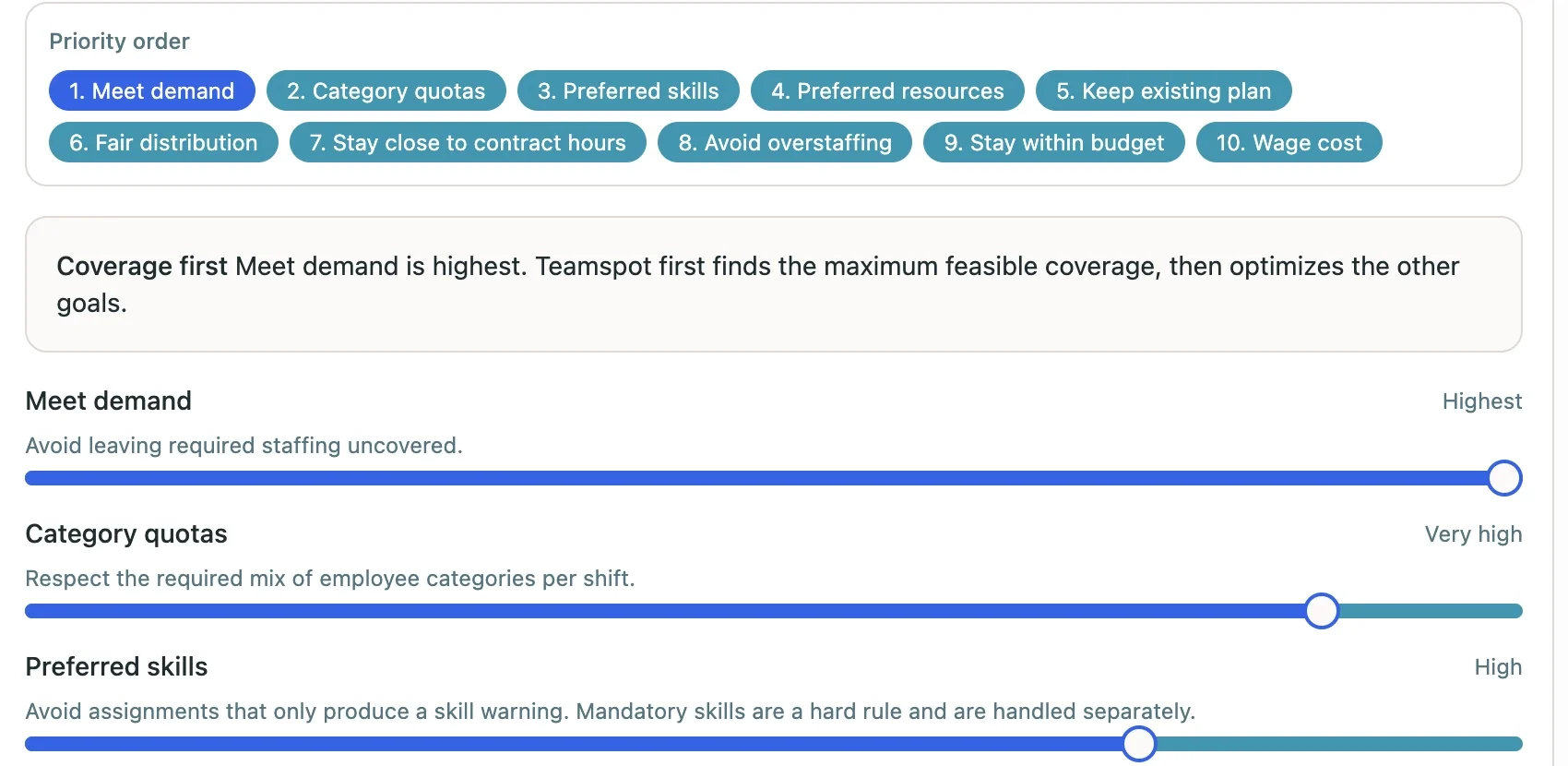
Not every employee can cover every task or shift. Teamspot balances company priorities, categories, and preferred skills without breaking hard scheduling rules. If no valid assignment exists, the shift stays open for a manager to resolve.

  • Use skills and categories as scheduling priorities.
  • Keep hard rules as real boundaries.
  • See which shifts remain open when no valid assignment exists.
Explore all features
Teamspot settings for staffing demand, skills, and scheduling priorities
Company priorities and skills are balanced within hard scheduling rules.Enlarge — opens in a new tab

Absence and changes

Respond to absence without starting another message thread

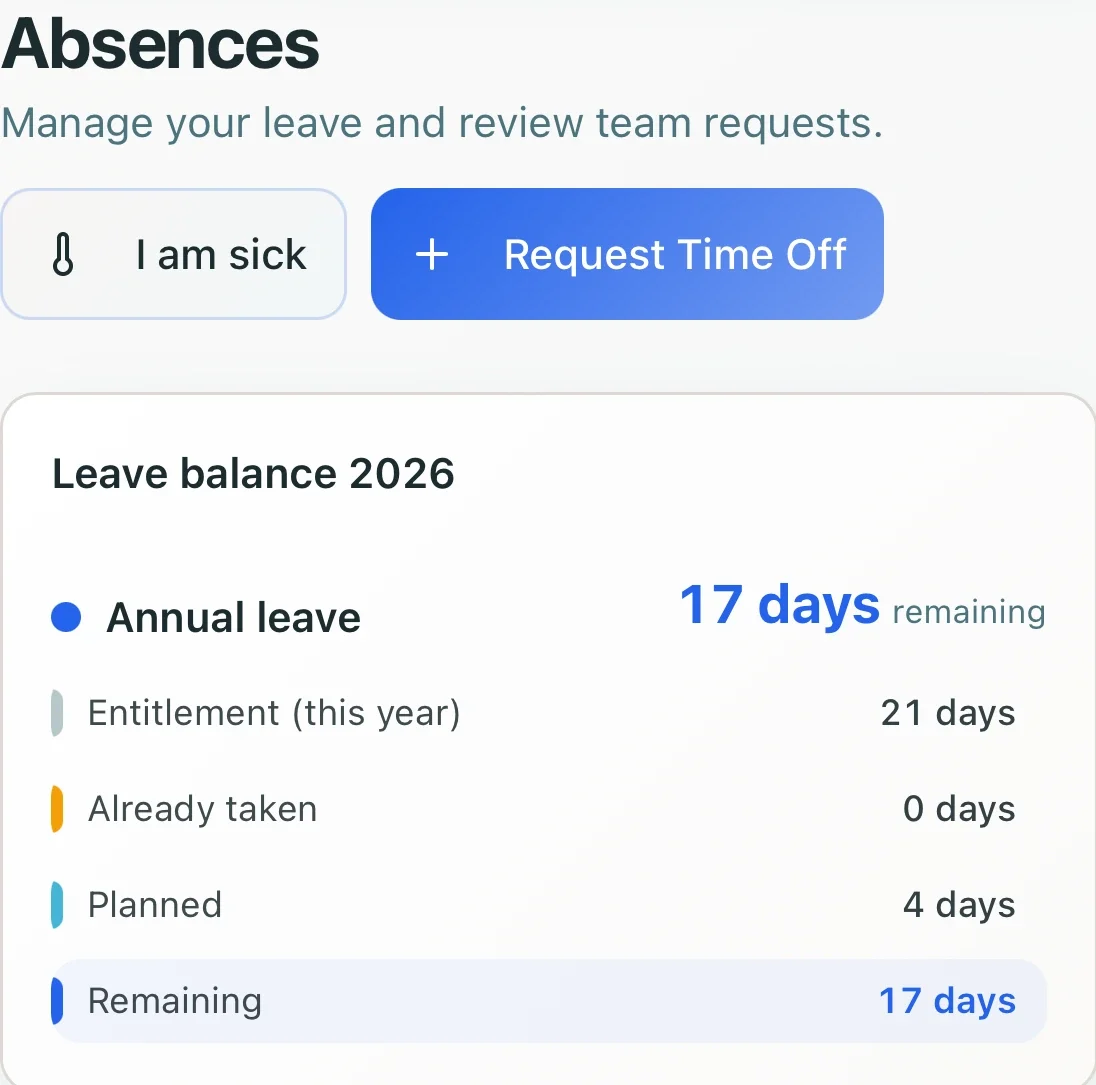
Leave, availability, and the current schedule stay in the same environment. Managers can see where a gap appears and adjust the plan without reconstructing several spreadsheets and WhatsApp groups first.

  • Keep availability and leave with the schedule.
  • Give employees one current place for their shifts.
  • Share changes without distributing new file versions.
Explore Teamspot for logistics
Employee leave balance and request options in Teamspot
Leave and requests remain connected to the schedule the operation uses.Enlarge — opens in a new tab

Hours and cost control

Review worked hours before payroll

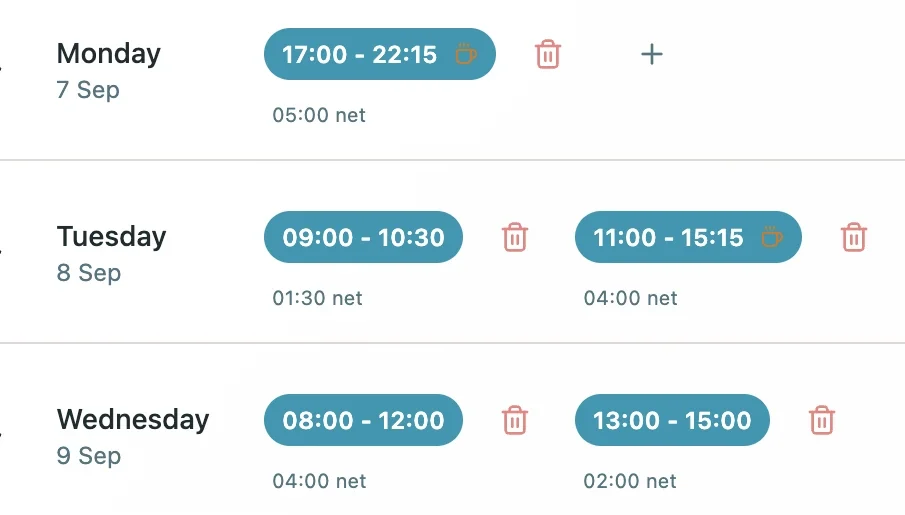
Work intervals, net hours, and overtime stay in one reviewable record. Managers approve the hours and export the reviewed data for payroll.

  • Review work intervals and net hours by day.
  • Calculate overtime from the recorded time.
  • Export approved data to Excel, PDF, or CSV.
Explore pricing
Teamspot time record with work intervals and net hours
Worked hours remain ready for review before payroll.Enlarge — opens in a new tab

Workforce planning beside your WMS

From required coverage to reviewed hours

Your WMS continues to manage inventory, orders, and warehouse execution. Teamspot shows managers who is available, who is scheduled, which gaps remain, and which hours were recorded.

  1. 01

    Make demand visible

    Define how many people the operation needs for each period.

  2. 02

    Apply rules and skills

    Balance priorities and skills inside hard scheduling rules.

  3. 03

    Review the proposal

    Check assignments, open shifts, and hours before applying the schedule.

  4. 04

    Export worked hours

    Use approved records in the existing payroll process.

The main question when switching

We already have a WMS and operations dashboards. Why add another system?

Your WMS manages goods, orders, and warehouse execution. Teamspot manages the people side: availability, staffing demand, scheduling rules, changes, and worked hours. It works alongside your WMS without claiming an integration that has not been verified.

  • The WMS remains responsible for inventory, orders, and execution.
  • Teamspot makes staffing demand, assignments, and open gaps visible.
  • Managers review the proposal before applying the schedule.
  • Worked hours are exportable into the existing payroll process.

Questions from logistics leaders

What to know before changing your scheduling process

Clear answers about the role of your WMS, shift coverage, absence, skills, locations, and payroll records.

Does Teamspot replace our WMS or transport management system?

No. Teamspot manages workforce planning: availability, staffing demand, schedules, changes, and worked hours. Your WMS or transport system remains responsible for inventory, orders, routes, and operational execution.

Can Teamspot help when staffing demand changes by shift?

You can define the coverage required and see which shifts and hours remain open. Managers review and adjust the proposal before applying the schedule.

How do we respond to a last-minute absence?

Availability, leave, and the current schedule stay together. Managers can see where the gap appears and which employees may be available to cover it.

Can schedules account for roles and skills?

Teamspot can use categories and preferred skills as company priorities. Hard scheduling rules remain boundaries, even when that means leaving a shift open.

Does Teamspot work across multiple locations?

Teamspot is built for organizations that want to manage employees, shifts, and hours across locations. A demo can confirm how that structure fits your sites and responsibilities.

Which records can we export to payroll?

Managers can review work intervals, net hours, and overtime. Approved records can then be exported to Excel, PDF, or CSV for the existing payroll process.
Make shift coverage easier to plan, review, and adjust.

Tell us how shifts, availability, absence, and hours work today. A senior workforce management colleague will discuss where Teamspot fits beside your operational systems.

Request a demo

We will get in touch to align the demo with your logistics scheduling process.